You have all been told for years that you must add lots and lots of images to your sites. You’ve learned that visitors enjoy looking at pictures of houses, that blog readers are pulled in by having large images at the top of a post.
But is it possible to bring more traffic in from the search engines because of how you use images on your sites? The answer is yes. Today we’ll cover a few ways to help your site rank better using images.
Before we continue, take six minutes and watch these three Google Webmaster videos:
That pretty well sums up this post…oh, you want more? Fine, keep reading.
Use Descriptive File Names for Images
In video 1, Matt flat out tells us – YES OPTIMIZING IMAGES WILL INCREASE TRAFFIC. What else do I need to say to convince you?
Matt suggests using descriptive file names for your images. Don’t keep the bland,boring name your camera created, what good is a name like “dsc00234.jpg”? You should use a carefully thought out descriptive name. You shouldn’t get too carried away with long file names, but I do suggest using multiple words. Of course, keep in mind our tip from last week and use dashes to separate the words in your file name. Possibly use something like: “3576-lakeview-street-homerville-tennessee-kitchen-1.jpg”.
Use ALT Tags for Images
In Video 2, Matt reinforces something I and others have already told you – ALT tags for your images are important. However, he does tell us something new; it’s OK to use slightly longer, more descriptive text instead of just “cat”, “house” or “motorcycle.” So what does that mean for you? It means that when you take pictures of a house you are listing, you have an opportunity to really do a good job of describing the property through photos, in a way the search engines not only understand, they want. Consider putting something like this in your ALT tags: “123 brookehaven road, Jasper, Wyoming – master bedroom – MLS 123456″. Be creative in your description, use words people will be using when they search the web.
Image File URLs
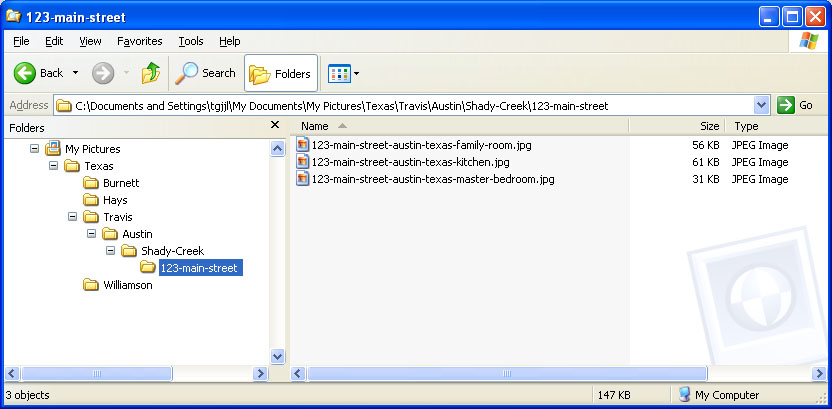
In video 3, Matt reminds us that the URLs of files help the search engines figure out what is in the picture. Depending on how your site is constructed, this might take a little bit of planning. Rather than just drop all you images in a generic folder named “images”, or named for the date you uploaded them (like WordPress does by default), perhaps you should consider creating a special structure to store them in. You could get pretty detailed if you wanted to take the time. You may want to create a folder structure like what’s shown here, based on your state, county & city names. Of course, YOU should know your web traffic better than I do, use names you KNOW people use in searches, based on your keyword research.
BONUS Information
How well did you listen to video 3? Go back and listen to it again, starting from about the 25 second mark, ending at about the 40 second mark. OCR and Meta-data for the images? Now we’re talking.
OCR?
OCR, if you don’t know, stands for Optical Character Recognition. Matt’s comment implies that Google is able to READ and understand the text with in your images. How can you use this? Start adding a crisp, clear title to all of your images. Make it easy for them, place the text on a plain background and use a simple, non-swirly font.
Meta-data?
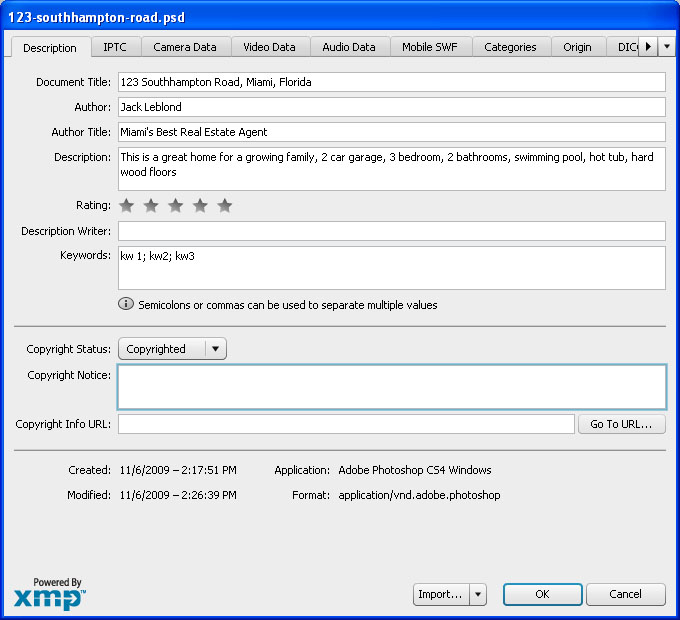
OMG! Not more meta tags! Take a deep breath, relax. It’s not more geeky tags. Image meta-data is often added automatically by digital cameras and it can be edited by many image editing tools to add all sorts of information. The image to the right is a screen shot taken from within Adobe Photoshop, but the software that came with your camera may also allow you to edit your files like this. Place your descriptive text within these fields before you upload them.
I know this was a lot of information, but I’m confidant you can manage it.
When working with images, keep the fortune cookie in mind; how it looks on the outside is important, but sometimes it’s what you can’t see that is more important.
The announcement from Yahoo!, Live & Google that they will be supporting a new "canonical url tag" to help webmasters and site owners eliminate self-created duplicate content in the index is, in my opinion, the biggest change to SEO best practices since the emergence of Sitemaps. It's rare that we cover search engine announcements or "news items" here on SEOmoz, as this blog is devoted more towards tactics than breaking headlines, but this certainly demands attention and requires quick education.
To help new and experienced SEOs better understand this tag, I've created the following Q+A (please feel free to print, email & share with developers, webmasters and others who need to quickly ramp up on this issue):
How Does it Operate?
The tag is part of the HTML header on a web page, the same section you'd find the Title attribute and Meta Description tag. In fact, this tag isn't new, but like nofollow, simply uses a new rel parameter. For example:
link rel="canonical" href="http://www.seomoz.org/blog"
This would tell Yahoo!, Live & Google that the page in question should be treated as though it were a copy of the URL www.seomoz.org/blog and that all of the link & content metrics the engines apply should technically flow back to that URL.
The Canonical URL tag attribute is similar in many ways to a 301 redirect from an SEO perspective. In essence, you're telling the engines that multiple pages should be considered as one (which a 301 does), without actually redirecting visitors to the new URL (often saving your dev staff considerable heartache). There are some differences, though:
Whereas a 301 redirect re-points all traffic (bots and human visitors), the Canonical URL tag is just for engines, meaning you can still separately track visitors to the unique URL versions.
A 301 is a much stronger signal that multiple pages have a single, canonical source. While the engines are certainly planning to support this new tag and trust the intent of site owners, there will be limitations. Content analysis and other algorithmic metrics will be applied to ensure that a site owner hasn't mistakenly or manipulatively applied the tag, and we certainly expect to see mistaken use of the tag, resulting in the engines maintaining those separate URLs in their indices (meaning site owners would experience the same problems noted below).
301s carry cross-domain functionality, meaning you can redirect a page at domain1.com to domain2.com and carry over those search engine metrics. This is NOT THE CASE with the Canonical URL tag, which operates exclusively on a single root domain (it will carry over across subfolders and subdomains).
Over time, I expect we'll see more differences, but since this tag is so new, it will be several months before SEOs have amassed good evidence about how this tag's application operates. Previous rollouts like nofollow, sitemaps and webmaster tools platforms have all had modifications in their implementation after launch, and there's no reason to doubt that this will, too.
How, When & Where Should SEOs Use This Tag?
In the past, many sites have encountered issues with multiple versions of the same content on different URLs. This creates three big problems:
Search engines don't know which version(s) to include/exclude from their indices
Search engines don't know whether to direct the link metrics (trust, authority, anchor text, link juice, etc.) to one page, or keep it separated between multiple versions
Search engines don't know which version(s) to rank for query results
When this happens, site owners suffer rankings and traffic losses and engines suffer lowered relevancy. Thus, in order to fix these problems, we, as SEOs and webmasters, can start applying the new Canonical URL tag whenever any of the following scenarios arise:
While these examples above represent some common applications, there are certainly others, and in many cases, they'll be very unique to each site. Talk with your internal SEOs or SEO consultants to help determine whether, how & where to apply this tag.
What Information Have the Engines Provided About the Canonical URL Tag?
Quite a bit, actually. Check out a few important quotes from Google:
Is rel="canonical" a hint or a directive? It's a hint that we honor strongly. We'll take your preference into account, in conjunction with other signals, when calculating the most relevant page to display in search results.
Can I use a relative path to specify the canonical, such as ? Yes, relative paths are recognized as expected with the tag. Also, if you include a link in your document, relative paths will resolve according to the base URL.
Is it okay if the canonical is not an exact duplicate of the content? We allow slight differences, e.g., in the sort order of a table of products. We also recognize that we may crawl the canonical and the duplicate pages at different points in time, so we may occasionally see different versions of your content. All of that is okay with us.
What if the rel="canonical" returns a 404? We'll continue to index your content and use a heuristic to find a canonical, but we recommend that you specify existent URLs as canonicals.
What if the rel="canonical" hasn't yet been indexed? Like all public content on the web, we strive to discover and crawl a designated canonical URL quickly. As soon as we index it, we'll immediately reconsider the rel="canonical" hint.
Can rel="canonical" be a redirect? Yes, you can specify a URL that redirects as a canonical URL. Google will then process the redirect as usual and try to index it.
What if I have contradictory rel="canonical" designations? Our algorithm is lenient: We can follow canonical chains, but we strongly recommend that you update links to point to a single canonical page to ensure optimal canonicalization results.
• The URL paths in the tag can be absolute or relative, though we recommend using absolute paths to avoid any chance of errors.
• A tag can only point to a canonical URL form within the same domain and not across domains. For example, a tag on http://test.example.com can point to a URL on http://www.example.com but not on http://yahoo.com or any other domain.
• The tag will be treated similarly to a 301 redirect, in terms of transferring link references and other effects to the canonical form of the page.
• We will use the tag information as provided, but we’ll also use algorithmic mechanisms to avoid situations where we think the tag was not used as intended. For example, if the canonical form is non-existent, returns an error or a 404, or if the content on the source and target was substantially distinct and unique, the canonical link may be considered erroneous and deferred.
• The tag is transitive. That is, if URL A marks B as canonical, and B marks C as canonical, we’ll treat C as canonical for both A and B, though we will break infinite chains and other issues.
This tag will be interpreted as a hint by Live Search, not as a command. We'll evaluate this in the context of all the other information we know about the website and try and make the best determination of the canonical URL. This will help us handle any potential implementation errors or abuse of this tag.
You can use relative or absolute URLs in the “href” attribute of the link tag.
The page and the URL in the “href” attribute must be on the same domain. For example, if the page is found on “http://mysite.com/default.aspx”, and the ”href” attribute in the link tag points to “http://mysite2.com”, the tag will be invalid and ignored.
However, the “href” attribute can point to a different subdomain. For example, if the page is found on “http://mysite.com/default.aspx” and the “href” attribute in the link tag points to “http://www.mysite.com”, the tag will be considered valid.
Live Search expects to implement support for this feature sometime in the near future.
What Questions Still Linger?
A few things remain somewhat murky around the Canonical URL tag's features and results. These include:
The degree to which the tag will be trusted by the various engines - will it only work if the content is 100% duplicate 100% of the time? Is there some flexibility on the content differences? How much?
Will this pass 100% of the link juice from a given page to another? More or less than a 301 redirect does now? Note that Google's official representative from the web spam team, Matt Cutts, said today that it passes link juice akin to a 301 redirect but also noted (when SEOmoz's own Gillian Muessig asked specifically) that "it loses no more juice than a 301," which suggests that there is some fractional loss when either of these are applied.
The extent of the tag's application on non-English language versions of the engines. Will different levels of content/duplicate analysis and country/language-specific issues apply?
Will the engines all treat this in precisely the same fashion? This seems unlikely, as they'd need to share content/link analysis algorithms to do that. Expect anecdotal (and possibly statistical) data in the future suggesting that there are disparities in interpretation between the engines.
Yahoo! strongly recommends using absolute paths for this (and, although we've yet to implement it, SEOmoz does as well, based on potential pitfalls with relative URLs), but the other engines are more agnostic - we'll see what the standard recommendations become.
Yahoo! also mentions the properties are transitive (which is great news for anyone who's had to do multiple URL re-architectures over time), but it's not clear if the other engines support this?
Live/MSN appears to have not yet implemented support for the tag, so we'll see when they formally begin adoption.
Are the engines OK with SEOs applying this for affiliate links to help re-route link juice? We'd heard at SMX East from a panel of engineers that using 301s for this was OK, so I'm assuming it is, but many SEOs are still skeptical as to whether the engines consider affiliate links as natural or not.
Everyone wants to know how to generate more web site traffic unless you know them you can’t run a successful business. There are many techniques with which you can easily generate/drive traffic to your website. I want to explain some high-impact traffic generating techniques so that you can use implement them to minimize time and to maximize the results.
1- Social Bookmarking
2- Social Networking
-MySpace
-FaceBook
3- Web 2.0 Pages
4- Article Submission
5- Press Release
6- Forum Posting
7- Blog Commenting
8- Directory Submission
9- Classified Ads Posting
10- Regional Traffic
More….
The main goal of this traffic generation is nothing but maximizing your Search Engine Rankings so that your website would get displayed in the Top of SE’s for your main targetted keyword.
Implement all the strategies that I have mentioned above once you are done with the On-Page Optimization which I have been discussing so far..these are the minimum things which you have to make sure that you followed all factors that I have mentioned.
Search engines are changing their techniques day by day. So every coming day brings some SEO updates for webmasters. Search engine like Google use to change its algorithms after couple of weeks that’s why some time PR update brings some unexpected and shocking results.
As every body use to search the desired information through some search engine, most probably Google. Obviously, every one wants to touch relevant date instead of wandering around the different sites. Search engine help us by sorting out the sites in such a way that the most relevant site comes up in top results. So in order to bring their sites among the top results webmasters use different techniques and the process of bringing these sites at the top of the list by using SEO updates in legalized way is called white hat SEO.
Search engines use different algorithms in order to sort out the data in better and faster way. However, the most successful and popular of all algorithms was developed in Stanford University by Larry Page and Sergey Brin. This algorithm was named Page ranking. The prototype of this algorithm was launched in the market in 1998 with the name of “Google”.
Page rank algorithm was based on votes. For example, a link from site X to site Y is counted as a vote from site X for site Y. The site which has the more votes means have more back links will be considered more important and will get a higher “page rank”. One interesting fact is that Google assess the importance of a site through the sites from where it is getting back links. No doubt every back link is considered as a vote but different votes have different values. That means if your site get a back link from a site which has a good page rank and healthy back links that will ultimately affect the ranking of your site in next PR update.
So we can say that more and more back links is not the only way of optimizing your site for high search engine ranking. Rather then that if you want to see your site with good page rank after next PR update then don’t go for back links only, instead of this try to go for quality back links. Rather then back links, search engine also consider many other factors while allocating page rank, so webmasters should keep an eye on SEO updates, in order to get the idea about the working of search engine algorithms. Some times sites having healthy back links fail to get good page rank during PR update rather then that Google penalizes those sites which use to get back link by using black hat techniques. While if you will upload sites of same nich on the same ip of the hosting it may effect the google page rank of your sites.
In short we can say that search engines optimization is not a rocket science rather then it is the name of continuously changing field, in which you can get guidance through SEO updates or you can also try your ways by following search engine guidelines. It really needs some thing beyond expertise. People who are working in this widespread field of search engine optimization love to get useful SEO updates.



 Posts
Posts

